Pages

Thursday, 29 September 2011

Samsung Galaxy Skin: Flexible Android Smartphone For Masses

galaxy-skin-179
This Smartphone can be folded. It can be beaten to pulp with a hammer but it will survive the hardest blows. No we are not talking about a phone from the latest James Bond. In fact we are talking about Samsung's new smartphone called 'Skin'.


Certain reports in the online world state that Samsung's futuristic foldable Android smartphone will be available in the consumer market in the first quarter of 2012. The first news of the Samsung Skin as a concept was reported by International Business Times.

This phone has a 1.2 GHz processor, high-resolution AMOLED screen, 8MP camera, 1GB of RAM and will run the latest Android. The technology relies on atom-thick layers of 'graphene' sandwiched together, protecting a layer of liquid crystal 'screen'.

"AMOLED is already the mobile screen technology to beat, so if it's as good as promised, flexible AMOLED could put an end to smashed smartphone displays and tablets, which are even more fragile," Will Findlater, editor of Stuff magazine, told the Daily Mail which first reported the story about the phone being available in spring 2012.
This is indeed interesting technology and we are intrigued about how the retail device will perform. Keep reading this space for more updates.

Apple iPhone 5 Details to Emerge on October 4


iphone5-invite2-5220175Apple has sent out invitations to an event on October 4 when the iPhone 5 announcement is expected. The event will be held at Apple’s Cupertino campus at 10am PT, and invite simply says “Let’s talk iPhone”, along with four iOS icons depicting the date, time and location of the venue.

The October 4 date was first tipped last week by All Things D's John Paczkowski, who reported that fresh Apple CEO Tim Cook would be hosting the iPhone 5 announcement after he took over the top job following Steve Jobs' resignation in August.
The iPhone 5 has been the subject of much speculation in recent months, after Apple didn’t stick to its traditional iPhone release schedule in the summer. There is very little known about the upcoming device, besides sure-fire speculation that it would feature the dual-core processor found on the iPad 2 and a higher resolution camera.
Pundits don't seem to agree on whether Apple will launch two iPhone models this autumn. Some reports claim the new iPhone will be very similar to the iphone 4, but with bumped specs, while other expect a wholly refreshed iPhone with a larger screen and an even thinner profile.
Apple's next version of iOS – iOS5, which powers iPhones, iPads and iPod touches, has been in limited beta since this summer, and a final version of the software should also be unveiled at the October 4 event.

What You Need to Know About Windows Phone "Mango"


WP-Mango-FactsI was fortunate to sit down this morning with Microsoft's Paul Bryan, Windows Phone senior director of product management and enterprise experiences, to discuss the new software at the company's offices in Cambridge, Massachusetts. And I learned quite a few facts that anyone interested in WP7.5 should know.

1) The brand new software is no longer called "Mango". That term was an internal codename used during development, and the official name of Microsoft's latest mobile OS is Windows Phone 7.5 (WP7.5)
2) Windows Phone 7.5 is expected to become available on all current Windows Phone devices. There are no new hardware requirements to run the latest OS, though newer devices will be able to take advantage of new software enhancements that will be unavailable on some existing WP7 devices. And all current Windows Phone 7 apps are compatible with WP7.5
3) Microsoft has posted a website that lets you check to see when the Windows Phone 7 software update will be available for your device and/or wireless carrier. The WP7.5 update will be distributed via the Microsoft Zune service and you'll need to tether your device to a PC to download it; the update will not be available wirelessly.
4) The software update includes more than 500 new features and enhancements, many of which are designed to consolidate and integrate various messaging services and provide users with a more unified messaging, social networking and Web experience, according to Bryan.
5) You can now tie contacts' Twitter and LinkedIn accounts to their address book listings, so all communications with those contacts via the two popular social networking services are available in one central location, along with text and e-mail messages.
6) All Windows Phone 7.5 devices will run Microsoft's latest mobile browser, Internet Explorer (IE9), which supports HTML 5 for advanced Web apps and HD video streaming.
7) A new "Bing Vision" app lets you scan QR codes and Microsoft "Tags" to instantly access online information, and the app also has a cool new feature that lets you scan the covers of books to quickly access information on the book, such as author, price, reviews and more. This ability to scan random book covers opens up a new set of possibilities for image scanning in the future via Bing Vision.
Windows Phone 7.5 (aka "Mango")8) A new "App Connect" feature for Windows Phone 7.5 developers lets them create complex applications that can be tied to various additional phone functions, including search results, so if a user queries a specific term that's related to an app, he could see that application, or a part of that app, recommended as a result.
App Connect also let developers serve up "richer" content via "live tiles," which users can pin to their home screens to customize their UI experiences. For example, a user who's interested in the new Brad Pitt film, "Moneyball," could not only pin a tile for the Flixster movie application, they could pin a "Moneyball"-specific tile to their home screen for movie information, including reviews, etc., via the Flixster app. (Learn more on the Windows Phone Developer blog)
9) Windows Phone 7 supports both visual voicemail and mobile hotspot, though it will be up to the wireless carriers that sell the device to decided whether or not to enable the features, and/or to charge additional fees for them.
10) Three new hardware manufactures have signed on to build Windows Phone 7.5 devices, including ZTE, Acer and Fujitsu -- HTC, Samsung, Dell and Nokia are also Windows Phone partners.

Mozilla Firefox 7 Released, with Good Reasons To Upgrade


Mozilla-Firefox-7-ReleasedSix weeks to the day after the official release of Firefox 6, Mozilla on Tuesday rolled out Firefox 7, the next version of its popular Web browser for Windows, Mac, Linux and Android users. The new release comes as part of the rapid release schedule Mozilla implemented for Firefox earlier this year, by which users are offered upgrades every six weeks.

Business users who want less-frequent updates will soon have a slower alternative schedule. The first such enterprise-focused Extended Support Release (ESR) version of desktop Firefox is expected to be based on Firefox 8 or 9 later this year.
In the meantime, there are plenty of reasons to make the switch to this newest version, which is now available as a free download. Many of them, in fact, boil down to one key thing: faster speed.

1. Memory Management
Ever since Firefox 7 entered the Aurora channel back in July, its primary focus has been speedier performance and better use of memory, and that emphasis is apparent in the software released today.
Firefox 7 manages memory more efficiently than its predecessors did, Mozilla says, for a speedier Web browsing experience. "Users will notice Firefox is faster at opening new tabs, clicking on menu items and buttons on websites," the organization says. "Heavy Internet users will enjoy enhanced performance when lots of tabs are open and during long Web browsing sessions that last hours or even days."
A new Mozilla Hacks blog entry posted today offers several key metrics demonstrating Firefox's new nimbleness.

2. More Speed
New tools included in Firefox 7, meanwhile, are designed to make it easier for developers to build speedy Web experiences for users. A new version of hardware-accelerated Canvas, for instance, speeds up HTML5 animations and games in the browser, allowing developers to build more compelling and interactive Web experiences.
Firefox now also supports the W3C navigation timing spec API so developers can measure page load time and website navigation against bandwidth speed, website traffic and other factors. This API allows developers to test user experiences remotely and easily so they can quickly optimize websites and Web apps for different types of users.
3. A New Performance ToolFocusing on future speeds, Firefox 7's new Telemetry tool collects performance feedback so as to help Mozilla make future Firefox releases even faster.
"Firefox 7 marks a turning point in how we measure Firefox performance," reads a Mozilla Hacks blog post from this morning on the topic. "Traditionally we measured Firefox performance on individual developer machines and our build & release infrastructure. However it turns out synthetic benchmarks do not correspond to real-world Firefox usage: it is difficult to model a 'typical' computer in a lab environment."
Exceptionally slow consumer hardware, changes in usage patterns and preinstalled "bloatware" can all affect Firefox performance in unexpected ways, the post notes.
The browser's new Telemetry tool will prompt users to opt into reporting performance data to Mozilla. "This data will supplement our existing benchmarking infrastructure to help us optimize future Firefox releases," the post explains. Telemetry performance metrics are very lightweight, however, and will not negatively impact Firefox performance, Mozilla says.

4. Add-On Compatibility
When Firefox 6 launched, 97 percent of add-ons compatible with Firefox 5 were still compatible with version 6, according to Mozilla add-ons product manager Justin Scott, who wrote a blog post yesterday on the topic.
Not only that, but "we're on track to launch Firefox 7 tomorrow with 99 percent compatibility from 6," Scott added. With Firefox 8, which will reach beta later this week, compatibility issues should improve even more, he wrote.
Add-on users can also install Firefox's Add-On Compatibility Reporter to flag any problems with the software they use.
5. A Cross-Platform Approachfirefox mobileBy supporting tools like WebSockets across desktop and mobile platforms, Firefox lets developers create faster, seamless Web applications for use on mobile phones, tablets and computers. Firefox also now supports the W3C navigation timing spec API across desktop and mobile platforms, so developers can optimize websites and Web apps for different types of devices, platforms and networks.
A number of features in Firefox for Android, meanwhile, are designed to make it faster to browse the mobile Web, such as the ability to copy any website text and paste it into emails, website forms and SMS messages.

6. Free, as in Beer
Firefox is free in more ways than one. First and foremost is that it costs you nothing to install, use or upgrade--a winning feature by most accounts, though certainly not Firefox's only one.

7. Free, as in Freedom
Perhaps even more important, though, is that Firefox is open source software and so it doesn't restrict your use of the browser in any way. There's no vendor lock-in, and it's eminently flexible and customizable to your needs. Also significant is that Mozilla is what it calls a public benefit organization, existing not to make money but to make the Web better for everyone.

Amazon Unveils Kindle Fire Tablet


Amazon-Kindle-Fire-179Amazon.com has launched its long awaited Kindle Fire tablet at event held in Manhattan, New York. The device features a 7-inch multi-touch LCD  display (based on Gorilla Glass technology for extra protection), 8GB of storage, built in Wi-Fi connectivity, a 1GHz dual-core Texas Instruments' OMAP (Open Multimedia Application Processor), and weighs in at around 413 grams. The Amazon Kindle Fire tablet will also feature the Amazon Silk - a "cloud-accelerated" web browser that will reportedly make browsing faster.

The tablet, which runs on Google's Android OS, will cost $199 (~Rs. 9734), almost $300 cheaper than Apple's cheapest iPad, which starts at $499 (~Rs. 24,408) - However the Amazon Fire tablet doesn't feature 3G connectivity, and an in-built microphone and camera are also absent. The Kindle Fire tablet will ship from November15 onwards and is currently available for pre-order from their site (US only).
While it has been claimed that the Kindle Fire will pose a competitive threat to Apple's iPad, it might be more likely that it will compete with other Android devices such as those from Samsung, Motorola, RIM, and other tablet manufacturers. The Kindle Fire will have a distinct advantage over the other Android tablets , given that Amazon - the world's largest online retailer - unlike most other Android tablet makers, is a content and e-commerce enabler. In other words, with Amazon's ability to provide integrated access to content on it's site such as it's collection of 100,000 movies and TV shows, 17 million songs, apps, millions of books and full-color magazines, other manufacturers will find it very hard to compete with Amazon on services, entertainment and cloud offerings.
In addition to the Kindle Fire, Amazon also launched three new Kindle models - the Kindle Touch, Kindle Touch 3G and Kindle e-reader that retail for $99 (~Rs. 4843), $149 (~Rs. 7289) and $79 (~Rs. 3864) respectively.

Four iPhone 5 Predictions

iphone5-invite2-5220175_0Apple will put an end to the rumors and introduce its next iPhone on October 4--it's already sent out invitations to an iPhone-specific event that will be held at Apple's Cupertino campus. New Apple CEO Tim Cook is expected to take the stage and make the big announcement.

This means we've got just one more week for some good, old-fashioned speculation. Here's what I think we'll see at Apple's upcoming iPhone event:
Prediction #1: The New iPhone Will Look Different
Depending on which story you're reading, the next iPhone will either have a completely new design or be exactly the same, aesthetically, as the iPhone 4.
In other words, Apple has managed to keep the tech press guessing. But considering that Apple has gone 16 months without announcing a new iPhone, I would be surprised if the iPhone 5's design offers nothing new.
Prediction #2: Hardware Will be New, but Predictable
The iPhone 4 had a new design, but it didn't surprise us with its specs--it received the same A4 chip as the iPad. Following the same lines, I think the next iPhone will have the same dual-core A5 chip that debuted in the iPad 2.
I think we can probably look forward to a new camera--not only do rumors suggest that the next iPhone will have an 8MP camera, but Apple has a history of improving the iPhone's camera with each generation. To go with the new chip and camera, the next iPhone will also probably have 1GB of RAM--but Apple probably won't say much about this. After all, Apple doesn't usually spend a lot of time discussing specs.
Prediction #3: Hardware Isn't Everything
Rumor has it that the next iPhone will have software improvements, including expanded voice commands. The new voice commands--part of a feature reportedly called Assistant--are based on Siri, the virtual assistant software maker that Apple acquired last year.
This system-wide voice navigation system could be a standout feature that's exclusive to the iPhone 5, and a big focus at next Tuesday's event. Apple did make voice commands exclusive to the iPhone 3GS in 2009, so requiring an iPhone 5 for expanded voice commands isn't without precedent.
Bonus prediction: The event invitation includes a photo of the iPhone's maps application icon, which has me wondering if Apple will finally add turn-by-turn directions.

Prediction #4: A Cheaper iPhone
The use of the singular in the invitation ("Let's talk iPhone") has led pundits such as John Gruber to speculate that Apple will only launch one new iPhone, despite rumors to the contrary.
While Apple may not launch an iPhone 4S, it will still drop the price on its old iPhones as it has in the past. Low-cost, older-generation iPhones have proven to be very successful, and are one of the reasons AT&T far outpaced Verizon in sales in the second quarter, despite Verizon having the iPhone 4. I doubt Apple will give up that market.

Facebook to Enrich Mobile With HTML5


Facebook-Faceweb-MobileFacebook has an internal tool for developing mobile applications primarily using HTML5, which eventually should allow it to bring every feature of its Web platform onto mobile devices.

Facebook used the tool, internally called Faceweb, to introduce continuous News Feed updates to mobile devices last week, said Erick Tseng, head of mobile products at Facebook. The company hopes to have conjoined launches of feature updates on both mobile applications and the Web, he said at the Mobilize conference in San Francisco.
"The reason we're so excited about Faceweb is because by using HTML5 instead of all native development ... it allows us to actually keep pace with desktop features," Tseng said. HTML5 is a standard Web development language that can bring many capabilities of native apps, including offline operation, to the Web.
Facebook considers itself not a social network but a platform that can be pervasive throughout a user's mobile experience, Tseng said. Device makers including HTC and Sony Ericsson have already used Facebook APIs (application programming interfaces) to integrate Facebook functions deep in Android phones. This lets users plug into the "social graph" of the platform without even consciously going into a Facebook app or logging in. "That's a platform," Tseng said.
One new feature headed to mobile devices is Ticker, the real-time stream of friends' posts that appears in the corner of the Web browser. Ticker is especially well-suited to mobile because users can quickly check up on what's happening when they briefly have time, such as at a bus stop, Tseng said.
However, Tseng said he couldn't comment on whether Facebook will be integrated into Apple iOS 5, the new operating system coming in the iPhone 5, which is expected to debut next week. Apple disclosed earlier this year that the OS will include Twitter integration.
"I think it would be a great combination. Hope to see it soon," Tseng said. Tseng also declined to comment on when an expected Facebook app for the iPad will come out.

Nokia 600, 700 & 701: Symbian Belle Smartphones With NFC Launched


Nokia-600-700-701-179At a press conference in Bangalore today, Nokia unveiled three new smartphones - 600, 700 &701 running the latest Symbian mobile operating system - Belle. The Finnish mobile phone giant is promoting Near Field Communications (NFC) on these devices with a vengeance. Nokia is marketing in India as 'Just Tap'.


To showcase the power of these Symbian Belle devices, Nokia along with Divum, a Bangalore based developer firm, showcased the power of these devices by using the 701 to manoeuvre an All Terrain Vehicle (ATV) using an app developed by Divum. Please note that this app has nothing to do with NFC and it uses a Wi-Fi connection to function.

Commenting on the launch, T. S. Sridhar, Regional General Manager- South, Nokia India said, “The smartphone market in India has rapidly evolved and is at a very interesting stage. Consumers are looking beyond the basic functionality of the smartphone. They realize the importance of form and shape of a device packed with innovative technology and look for the same in all smartphones. We believe our latest range of smartphones powered by Symbian Belle, with path-breaking technology in the form of ‘Just Tap’ NFC, will push the boundaries for future devices in this segment.”

The 700 features a 1 GHz processor and the body is entirely made of recycled plastic. It also has a 3.2 inch ClearBack Amoled display with Gorilla Glass. This is Nokia’s thinnest phone yet and looks the best of the lot.

The 701 has a bigger 3.5 inch In Plane Switching (IPS) LCD display with ClearBack technology and Gorilla glass. The 701’s new graphics processor supposedly has four times the graphics memory in comparison to older Symbian handsets. It looks like a refurbished C7.

With 1 GHz processor, the 600 is touted as the loudest Nokia smartphone that has been released till date. Again the phone looks strikingly similar to Nokia’s 5230/5233.
The Nokia 600 is priced at Rs. 12,999 (MRP), the Nokia 700 at Rs. 18,099 (MRP) and the Nokia 701 at (18,999) and is available at retail outlets across the country. Keep reading our website for the reviews of these phones.

Intel Hopes To Boost Flagging AppUp Store


Intel is making some changes to its AppUp store in hopes of improving what it admits has been dismal usage. During its AppUp Elements conference for developers in Seattle, Intel said that 807,000 applications have been downloaded and 350,000 consumers have registered to use the store.
Intel-AppupThe store, which launched in 2010, was designed to spur application development for netbooks. It also includes apps for PCs.

"We've sucked on getting consumers. It's proved more of a challenge for us than we thought," said Peter Biddle, general manager for AppUp.
To help spur usage, Intel plans to offer new features that developers can add to their apps, like in-app billing. In addition, it plans to offer a service that easily connects developers to other services they may want to tie into their applications, like location information or restaurant reviews.
It also plans to offer ways that third parties can curate the store. "We thought, maybe we should just try to compete directly with iTunes, but that seemed like a step back," said Biddle. "But now we're stepping forward. We're embracing the notion that the world will be good about telling other parts of the world about the neat things they've found."
Apple's App Store is the largest of its kind but has been criticized for being so large that it's difficult for people to find useful applications. In hopes of avoiding that kind of problem, Intel will allow people to create their own stores. For instance, someone with a photography website could build a store to steer people to photography-related apps in AppUp.
Intel already has 22 curators today but expects to have thousands in the future, it said.
Intel also announced on Wednesday the AppUp Creator, a beta service aimed at making it easy for anyone to build applications. Users can create a simple Web app and include elements like discussion forums, videos and photographs by dragging and dropping the elements onto a page.

Secure Boot on Windows 8: What We Know So Far


Linux-Win8-Secure-BootEver since it was first brought to light that Windows 8's secure boot mechanism could cause problems for Linux users, speculation has been running rampant as to the exact nature of the difficulties that may arise.

Will it mean that Linux users can't use Windows 8 PCs at all? Will users be able to disable secure boot in the Unified Extensible Firmware Interface (UEFI) protocol, effectively removing the problem?
Those and many related questions have been voiced repeatedly in the blogosphere over the past week or so, even as Linux Australia reportedly announced it is considering petitioning the Australian Competition and Consumer Commission (ACCC) with a claim that Microsoft's behavior is anti-competitive.
We probably won't know for some time still exactly how this is going to unfold, since Windows 8 is still on the distant horizon. In the meantime, though, it looks like "Windows 8 certified systems will make it either more difficult or impossible to install alternative operating systems," in the words of Red Hat developer Matthew Garrett.
Of course, there's a big difference between "difficult" and "impossible", and further comments have been made by both Garrett and Microsoft since my original coverage. Wondering where things stand? Here's a rundown of what appears to be the case so far.

1. Enabled by Default
Microsoft's Windows Certification program will require that all certified Windows 8 systems have secure boot enabled by default, according to a blog post published late last week by Steven Sinofsky, president of Microsoft's Windows division. To prevent malware from disabling the firmware's security policies, Microsoft's program will also require that firmware not allow "programmatic," or software-level, control of secure boot, as well as stipulating that OEMs prevent any unauthorized attempts at changing the firmware in ways "that could compromise system integrity", the blog post explained.
2. UEFIAt the heart of Microsoft's approach is the UEFI secure boot protocol, a BIOS alternative that "permits one or more signing keys to be installed into a system firmware", Red Hat's Garrett explained. "Once enabled, secure boot prevents executables or drivers from being loaded unless they're signed by one of these keys."
The problem for Linux, as I noted last week, is that it won't have any such signature by default, meaning that it wouldn't naturally be allowed to run on a Windows 8 certified machine.
Further, as Garrett says, "Windows 8 certification does not require that the system ship with any keys other than Microsoft's. A system that ships with UEFI secure boot enabled and only includes Microsoft's signing keys will only securely boot Microsoft operating systems".
Linux currently doesn't support UEFI secure booting, though that could change once hardware that uses it becomes available. "Adding support is probably about a week's worth of effort at most", Garrett added.
3. Disabling Secure Boot
UEFI can be modified to disable secure boot, at least in theory, and the Windows 8 tablet Microsoft demonstrated at its BUILD conference earlier this month did include the ability to do that.
However, "doing so comes at your own risk", Sinofsky's post asserted. Even more significant, his post noted that it's up to OEMs to choose how to enable such capabilities.
Whatever method vendors choose to make it possible to disable secure boot, users will still have choices as a result, Sinofsky added, such as the option to run older operating systems if they want.

4. Depends on Hardware Makers
Microsoft's overall message was to assuage concerns by asserting as Microsoft program manager Tony Mangefeste did, that "At the end of the day, the customer is in control of their PC." This has been echoed by some in the tech press. The reality, though, is that it sounds like it will ultimately be up to PC makers to decide whether or not they give users the ability to disable secure boot.
In fact, there is no requirement that certified PC makers give users the capability to disable UEFI secure boot, Garrett notes. And not only that, but "we've already been informed by hardware vendors that some hardware will not have this option."
The result, he wrote, is that "the end user is not guaranteed the ability to install extra signing keys in order to securely boot the operating system of their choice. The end user is not guaranteed the ability to disable this functionality. The end user is not guaranteed that their system will include the signing keys that would be required for them to swap their graphics card for one from another vendor, or replace their network card and still be able to netboot, or install a newer SATA controller and have it recognise their hard drive in the firmware. The end user is no longer in control of their PC."

5. Options for Linux
So what are Linux users' prospects, given all of this? Once again, it's important to remember that this is all very preliminary, since Windows 8 won't be out for a long time still.
Working with what we've seen so far, though, not buying a Windows 8 certified PC is certainly one obvious option for avoiding any potential problems, as is simply upgrading from Windows 7 on an existing dual-boot machine. Building your own machine is always an option as well.
Assuming Microsoft does allow hardware vendors to give users the option of disabling secure boot, it may also end up being a matter of shopping carefully to ensure that the Windows 8 machine you buy includes that capability.
Signed versions of Linux don't sound likely, as I noted last week, due to licensing issues with the Grub and Grub 2 bootloaders and the fact that self-signed Linux keys would then have to be included by every PC maker--a logistical nightmare if ever there was one.
Of course, Linux fans tend to be pretty savvy users. If things do indeed continue on this path, I'm betting a variety of other workarounds will soon emerge.

HTC Explorer Low Cost Android Smartphone In India


HTC-Explorer-179Featuring a 3.2-inch HVGA touchscreen, 3MP camera and HTC Sense UI, the HTC Explorer was unveiled today. This new budget-oriented Android phone is expected to be available in India from October 2011. The HTC Explorer comes with Adobe Flash support, and reportedly is first in its class with a HVGA display, allowing you to run nearly all of the applications in Android Market.

The HTC Explorer mobile phone includes a customizable lock screen, to function as a real-time window to your most important information and content - social updates, photos, weather or stock updates - that are viewed by simply waking up the display. The lock screen also enables quick access to the camera for photos. It also includes a new Smart Dialer that displays a one-touch menu for quick, easy dialling of contacts.
The HTC Explorer will be available in 3 colors - Metallic Black, Active Black and Metallic Navy. You can also customize it optional back covers including Metallic Blue, Metallic Orange, Metallic White and Metallic Purple. It is expected to be priced around Rs. 12,500.
Jason Mackenzie, president of global sales and marketing, HTC Corporation, said "HTC Explorer is an easy-to-use smartphone that puts the customer in control, providing quick access to their most important content and information. HTC Explorer is simply a smarter phone for anyone and it represents another clear demonstration of HTC’s global commitment to expanding the market for advanced smartphones."

Samsung Outstrips Apple in India's Tablet Market


Apple trails behind Samsung in India's fledgling tablet market, which is largely driven by relevant content and low prices, according to research released Thursday. Samsung had a 45.8 percent share of the country's 158,000 media tablets in the nine months ended June 30, according to CyberMedia Research. The company was the first to launch its tablets in the market in October last year, starting with the Galaxy Tab 7.

Apple was a relatively later entrant in January this year, and has garnered 18.4 percent share, according to CyberMedia. Research In Motion's PlayBook had a 21 percent share. CyberMedia reports shipments by vendors to distributors.
Apple's prospects in India are likely to remain more or less the same through the year, according to market research firm Gartner. The iPad is expected to have about 25 to 30 percent share of the approximately 200,000 tablets shipped to users during this year, said Vishal Tripathi, principal research analyst at Gartner. The share of the PlayBook is very small in terms of sales to users, though there may be a large number of units with distributors, he added.
Samsung in contrast is likely to have over 50 percent share, Tripathi said. Apple does not see India as a key market, and its focus in the country has been on its high-end models, he added. Samsung launched its Galaxy Tab 10.1 in India in August, and plans to launch its Galaxy Tab 8.9 shortly, a company spokeswoman said.
Apple's performance in India is in sharp contrast with its success worldwide, where the iPad is still the top-selling tablet. Gartner said earlier this month that Apple's iPad will have a 73.4 percent share of the tablet market in 2011, though down from 83 percent in 2010.
Interestingly, India is one of the countries where Apple has not brought legal action against Samsung for alleged patent infringements, nor sought an injunction on sales of the Galaxy Tab 10.1. The company is pursuing similar cases against Samsung in a number of countries. Apple did not immediately respond to a request for comment.

Tuesday, 27 September 2011

Google Enters Teens; Latest Doodle Marks Its 13th Birthday

Google-13th-birthday-179
Google finally enters its teens. The search engine giant turns 13 today and the latest doodle is dedicated to this event. The image has a birthday cake with 13 candles on it and the characters of the word Google are gathered around the cake.


However, this is one of the plainest doodle's we have seen in a long time considering some of the flash heavy doodles that were common in some of the recent doodles (remember the doodle commemorating Freddy Mercury’s 65th birth anniversary). The Google doodle which marks the biggest search engine’s 12th birthday was also very plain.
It is interesting to note that, the date September 27 is not the actual birth date of Google. Google as a service was initiated on September 7 and until 2005 the company celebrated its birthday on this date. In 2005, Google changed it to September 27 to coincide with the announcement of the record number of pages that the search engine was indexing.
Google claims that it has created doodles for around 900 occasions of which 270 of them running in 2010 and about 200 in 2011.

Now Shipping: New-Gen Intel Atom Cedar Trail Chips


Intel-Cedar-TrailIntel on Monday started shipping new low-power Atom chips built on the platform code-named Cedar Trail, with numerous improvements to boost graphics and application performance over their predecessor. The two new Atom chips (D2700 and D2500) are targeted at entry-level desktops and all-in-one PCs for Internet surfing and basic multimedia and productivity applications, an Intel spokeswoman said. The new dual-core Atom chips run at clock speeds of up to 2.13GHz and are able to play Blu-ray movies.

The Cedar Trail chips succeed the previous generation of Atom processors built on the platform code-named Pine Trail, which was criticized for poor video performance. Netbooks with the new Atom chips will ship in the fourth quarter, the spokeswoman said. Netbooks based on Cedar Trail chips were on display at this month's Intel Developer Forum.
Netbook shipments have been hurt by growth in tablets, but Intel is keeping the Atom chip for low-cost PCs alive in an effort to offer low-cost computing options. Intel is also promoting ultrabooks as a new class of thin and light laptops with tablet-like features. While the netbooks and desktops are for basic computing, the feature-rich ultrabooks are based on Intel's much faster Core processors and currently cost around US$ 1,000, with prices expected to drop.
The Atom D2700 processor runs at a clock speed of 2.13 GHz, is priced at US$ 52 and can run two threads per core. The D2500 processor operates at 1.86 GHz, is priced at US$ 42 and can run one thread per core.
The chips have 1MB of cache, and support the HDMI (high-definition multimedia interface) and DisplayPort interfaces. The chips will support up to 4GB of memory. The new chips are made using the 32-nanometer process, while the predecessors were made using the 45-nm process.

Samsung Galaxy Player, Galaxy Tab 8.9-inch & 4G Phones Unveiled


Samsung-NEw-Devices-179At an event yesterday, the Samsung Galaxy Tab 8.9-inch tablet was shown off before it officially goes on sale. The Galaxy Player 4.0 and Galaxy Player 5.0 media players will also be available on October 16th. In South Korea, their first 4G smartphones were launched - the Samsung Galaxy S2 LTE and Galaxy S2 HD LTE.

The Galaxy Tab 8.9 runs on Android 3.1 Honeycomb and features a dual core 1 GHz processor, a 6,100 mAh battery,  a WXGA (1280x800 resolution) screen, a rear-facing 3-megapixel camera and a front-facing 2-megapixel camera as well as providing for 1080p HD video playback.  The Galaxy Tab 8.9 (Wi-Fi), which will be available in the US from October 2nd onwards, comes in a 16GB version that is priced at US$469, and a 32GB version priced at US$569.
The 8GB models of the Galaxy Player 4.0 and Galaxy Player 5.0 media players are priced at US$229 and US$269 respectively. The number following the name of the media player denotes the screen size in inches. Both media players come with Android 2.3.5 Gingerbread, front and rear (3.2 MP) facing cameras, Bluetooth 3.0, and microSD memory support up to 32GB.  The media players will be available for sale starting October 16.
The Samsung Galaxy S2 LTE and Samsung Galaxy S2 HD LTE mobile phones are part of the Galaxy S2 family. They run on the Android 2.3 Gingerbread OS, have 16GB of internal memory, and feature a 1.5 GHz dual-core processor. As these phones support LTE (long-term evolution - a communication standard), their data transmission speeds are said to be five times as fast as those of the current 3G phones.  The S2 LTE has a 4.5-inch wide Super AMOLED display. The S2 HD LTE features a 4.65-inch high-definition AMOLED display, offering a screen of 720x1280 pixels - 720p HD resolution.

Monday, 26 September 2011

Samsung Wants iPad, iPhone Banned in Holland


fight-club-179Reeling under recent court decisions in Europe banning the sale of its Galaxy Tab on account of patent infringements, Samsung has hit back against Apple by seeking a ban on the sale of the variants of the iPhone and the iPad that use 3G technology. The case is expected to be heard in court today with Samsung asking for a "preliminary injunction" against the iPhone 3GS, iPhone 4, iPad and the iPad 2.

Webwereld Netherlands managed to view the legal documents pertaining to the complaints and noted that Samsung has claimed that the four Apple devices infringed on 3G patents from Samsung's patent portfolio. Along with the Netherlands, Samsung is looking for similar injunctions against Apple in the U.S., U.K., France, Germany, Japan and South Korea.
Samsung's acrimonious relationship with Apple has been sparked by the Cupertino company's recent lawsuit against the Korean handset manufacturer regarding copyright violations with reference to the Android OS and Samsung's own TouchWiz UI. As a result, the sale of the Galaxy Tab 10.1 was stopped in most European countries and later allowed with the exception of Germany.

Nokia Leads Smartphone Sales in Q2 2011: IDC Report


Nokia_Comparison_C6_C7_E7_N8-listingDespite Nokia's plans of shifting to Windows 7 for its new range of smartphone line-up expected to release next year, reports state that the Finnish mobile phone manufacturer's Symbian-based smartphones are leading the sales in India.

According to International Data Corporation's (IDC) report, Nokia lead the smartphone sales with 45.8% share in sales compared to the other leading players in the market. Samsung is second in smartphone sales with a 21% share.
G. Rajeev, Lead Analyst, Mobile Devices said, "The smartphone segment showed an impressive growth of 68% year-on-year and a marginal growth of 0.4% over the Jan-March 2011 quarter, to garner a share of 5.6% of the overall mobile phone market. In Q2 CY 2010, the share of smartphones was 3.6% of the overall mobile phone market, in unit terms."
Nokia already has a host of smartphones running Symbian Belle with faster processors and NFC lined-up for release. The future definitely looks bright for Nokia.

Internet as important as food, water, air, shelter?


The Internet is just as important as water, food, air and shelter to a third of people with Internet access, according to an international poll by Cisco. Roughly another half say they don't consider it that important, but it's close, according to the Cisco Connected World Technology Report. Cisco surveyed 2,853 people split roughly equally between college students and recently employed college graduates ages 21 to 29 in 14 countries. The groups were also evenly split between men and women.

The survey put a slightly different spin on the question, offering three choices and told to choose the one that describes their attitude the best:
I could live without the Internet;
I could live without the Internet but it would be a struggle;
I could not live without the Internet.
Among college students, 55 per cent say they could not live without the Internet compared to 62 per cent of those recent graduates with jobs. Another 30%-plus in both categories say they could survive, but it would be a struggle. More students (40%) rank the Internet as most important when stacked against partying (25%), dating (13%) and music (10%). They'd rather have Internet access than a car, 64% to 36%.
One thing they rely on the Internet for is news, with 77 per cent of students saying they get their news and other information via the Internet or other communications supported by laptops, desktop computers and smartphones. TV comes in a distant fourth at 7% and newspapers, magazines and books behind that at 7%. The results are similar for the working group. In India, 68 per cent of young employees surveyed preferred using smartphones, and consider it their "most important" device.
The survey also asked the college graduates with jobs about how they regard social media sites Facebook and Twitter. The results: 81% of employees who have it check in with Facebook at least once every day. Twitter is less popular, with 42% of its members checking it at least once a day. Facebook also claims a higher percentage of members -- 88% -- vs. Twitter -- 42%.
Most employees also seem willing to include people from work in their social networks. Among Twitter users 68% follow co-workers, bosses or both. The rest say they keep their personal and work lives separate. With Facebook, 70% of users friend co-workers, bosses or both.

Sunday, 25 September 2011

Google+ Social Networking Now Open to Everyone, New Mobile Features Added


Google-Plus-MobileGoogle opened the gates to its social network, Google+, to everyone on Tuesday and rolled out more than a dozen new features to the service, many of them aimed at mobile phone users.

For 12 weeks, Google+ has been in "field trials," Google Senior Vice President of Engineering Vic Gundotra explained in a company blog. "We're nowhere near done," he wrote, "but with the improvements we've made so far we're ready to move from field trial to beta." Now anyone can go to the Google+ site and sign up for the service.
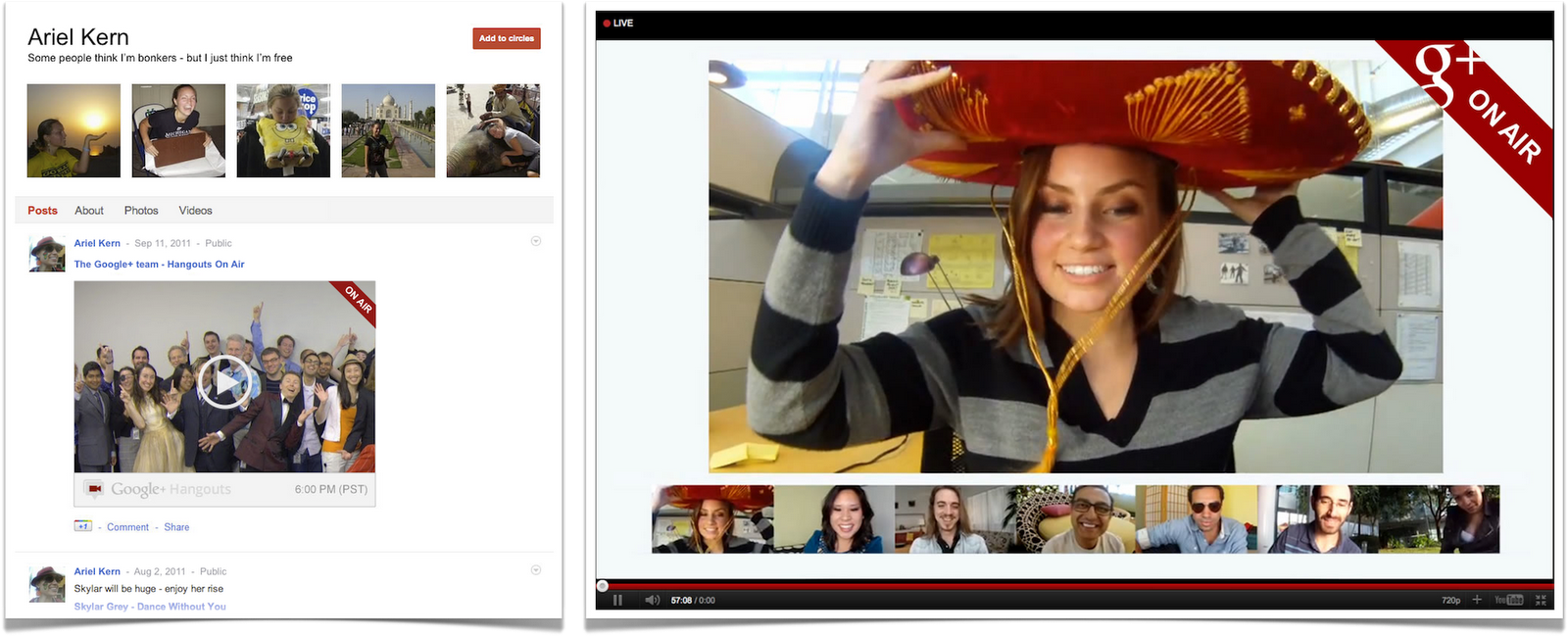
In addition to open enrollment, Google introduced a number of improvements to the hangout feature of Google+. Hangouts allow people to chat face to face through video. With today's improvements, users of Android phones will be able to use hangouts on their mobiles.
Google is also expanding the online version of hangouts. Now, through "Hangouts on Air," you can open up a hangout session and as many as nine people can join it. An unlimited number can watch the hangout session.
Hangouts is getting some extras, too. They allow you to share what's on your computer in a hangout, scribble with friends on an online sketchpad, share Google docs, and create or join public hangouts about a topic, like the collapse of your favorite sports team or raising alpacas.
With the new With the new "Hangouts on Air" feature, you can open up a hangout session and as many as nine people can join in.

Searching Made Easy

A welcome improvement for many Google+ users will be the introduction of a search feature into the social network. Now you can type words into a Google+ search box and find content you're interested in and as well as people to connect to.
New search capability in Google+New search capability in Google+Some mobile phone improvements were announced today, too. Better text messaging (SMS) support is now available in the United States and India. Now, from your cell phone, you can post to Google+, receive notifications, and respond to group messages through SMS.
You can also +mention people in posts or comments viewed on your phone. When you do that, the person will be notified that they're mentioned in the post or comment. And you can +1 comments, too, but only from iOS devices.
You can take care of more housekeeping of Google+ from your phone now, too. You can edit your profile photo and customize the notifications you receive on your cell, since you may not want your phone flooded with notifications while you're on the go.
If you have an Android phone, you can now move the Google+ app to a SD card to free up the mobile's internal storage.

Google+ Vocabulary Changes

With these improvements, Google also changes some of its social network's terminology. Its "Huddle" feature--which allows you to communicate with a friend or group of friends through text from Google+ --is now being called "Messenger." In addition to the name change, the feature now supports photo sharing.
This torrent of new features to Google+ came just 3 days before its arch rival was scheduled to hold its F8 Facebook developers conference. Although Google+ is the new kid on the social networking block, it has been gaining momentum among social networkers. It will be intriguing to find out what announcements Facebook may make that will slow down the Google+ momentum.

A challenge plays!

A challenge plays!
Now that you've added your blog, we need to make sure that you own this blog.

Saturday, 24 September 2011

Master The Taskbar And Start Menu


Windows Tips And Tricks

In Windows 7, the Start menu and the taskbar have become both easier to use and more sophisticated. However, they also offer a slew of additional capabilities and customization options that aren’t obvious when you first look at them. I’ll first walk through the plethora of options for each, and then dive into how to use them more effectively.

The Start Menu
The Start menu is so named because that’s where you go to start applications, restart or shut down Windows, and perform other basic application management chores. When you start up a new system, or perform a clean install of Windows, this is the Start menu you see.

Lots of people happily use the Start menu in this state, which is very XP-like. Unlike XP, though, the applications are sorted alphabetically. This tends to give recent XP converts heartburn, but you can change this behavior when you customize the Start menu. My personal preference is alphabetical sort, which you could do in XP by context clicking on the All Programs section and sorting.

The picture above is my Start menu, as I use it.

The first thing you’ll notice is the size--more programs are visible on the basic Start menu, without having to go to the dreaded "All Programs" section. Also notice that Downloads, Games, and Computer are pop-out menus. I use those particular folders frequently, so I find that using them as pop-outs on the Start menu is preferable to launching the actual Window, then clicking something else.

Now let's customize the Start menu. If you context-click (right-click) on the Start menu button, one of the two options is Properties. Click on that option, and the following window appears. (The other option merely opens Windows Explorer.)

You'll see a pair of settings here that you should enable: (1) Store and display recently opened programs in the Start menu, and (2) Store and display recently opened items in the Start menu and taskbar. These are put under "Privacy" because you may not want them enabled for a shared system, but for most users, turning these options on (if they're not already on by default) is a no-brainer.

Now click the Customize button.

You’ll see a fixed-size window (you can’t make it bigger), with a lot of different options. Here’s a summary of the changes I made to my own Start menu. I’m only going to list those changes, not what I kept at default settings.

- Number of recent programs / recent items to display (under "Start menu size"). The default is 10; I set it to 20, since I have a large display. If you’re running on a relatively low-resolution monitor (like a laptop), you may want to keep the number at 10.

- Computer. I enabled "Display as a menu." The various drives and top folders appear on a fly-out menu. Saves a click.

- Downloads. The default is "Don’t display," but I like it as a link, which lets me get to the Downloads folder with one click.

- Games. I display this in the Start menu as a fly-out menu. That’s a much quicker way to launch games that are in the Windows games folder.

- Network. I don’t often access this folder, but when I do, I want to get to it quickly, so enabling it as a link is fine.

- Recent Items. I turned this on, but it's one of those items you may want leave disabled on a shared system. On the other hand, it’s very handy to have quick access to recent files, without needing to find the Jump List for the individual application that may be associated with the files.

- Run command. This avoids having to type "Run" in the search box.

- System administrative tools. By default, this display option is turned off. I like having access to system management tools. It has some useful stuff that’s hard to find, so enabling this tools display is often helpful when you need to troubleshoot a problem.

Note that I leave "Sort All Programs menu by name" enabled (that’s the default.) If you uncheck it, the Start menu will sort programs by most recently installed. (If you change it after you’ve installed a bunch of apps, it will remain sorted alphabetically for a time, until you install more apps.) What you won’t get is the old Windows XP behavior, where you could manually reorder the icons in the Start menu. Some users may not like this.

If you’re so inclined, you can change many more settings by running the Windows 7 Group Policy Editor, but be cautious when using the policy editor.

Start Menu Shortcuts and Tips
Now that you’ve customized the Start menu to your preferences, it’s time to look at some additional shortcuts and tips on using the Start menu.

If you have a lot of programs installed, consider using the keyboard instead of hunting for them in the All Programs window. All you have to do is hold down the Windows logo key and the R key at the same time. This brings up the run box. If you type the name of the program, it will run. However, this assumes you know the exact name of the application. For example, if you want to run Word, you have to type "winword.exe". What, you didn’t know the actual Word program name is winword.exe?

If you know part of the name, but not the whole name, use the Start menu search function. Press the Windows logo key and just start typing "wor". If you wait just a moment for the search function to do its job, you’ll see quite a list.

Here, your version of Word appears as the top choice. But a variety of other apps, shortcuts, and document names have popped up as well, so you can click on whichever of those you want. On the other hand, when I hit the Enter key after typing "wor" (minus the quote marks, of course), then the top item in the list is opened--in this case, Microsoft Word. Simple and efficient.

Note that you will have to type more characters than you think you need on occasion. If you type "ex," then hit enter you’ll likely run Internet Explorer. If your intent was to run Excel, you’ll need to type "exc" at a minimum.

Now it’s time to move on to the Windows taskbar.

Customizing the Windows Taskbar
The Windows Taskbar has evolved from being a simple indicator of open applications to a much more active user interface entity in its own right. The key features of the taskbar, as you probably have discovered, are Jump Lists and Aero Peek. However, before examining taskbar features, it’s worth spending some time customizing the taskbar. Like the Start menu, the taskbar can be configured to behave more to your liking.

First, let’s take a look at my taskbar. This is actually relatively uncluttered for me--I often have many more windows and apps open.

Right-click on any empty space in the taskbar and click Properties. The taskbar and Start menu properties sheet will pop up, with the taskbar tab active.

This is the default setting--taskbar locked, at the bottom of the window and Aero Peek enabled. I strongly suggest you leave Aero Peek turned on--it’s one of the most useful features of the Windows 7 taskbar. When it comes to the way you view icons, applications and files in the taskbar, though, it's mostly up to your personal preference.

The default is to have just unlabeled icons. If you run more than one instance, or have multiple documents open in a particular app, you’ll see a layered icon. You will never see more than three layers, though. So you won’t know if you’ve got more than three docs open or three instances of a particular app running. You also won’t know the names of the documents without hovering over the icons.

If this bugs you, you can change the taskbar buttons to Combine when taskbar is full in the Taskbar button pulldown. Windows will combine certain sets of objects when the taskbar fills up. Note that what's visible in the taskbar may vary, depending on what types of documents or folders you open, and the number of each type.

If you choose never combine, what’s visible in the taskbar becomes smaller and smaller, until they’re very small icons.

Other options on the primary properties page include "Lock the taskbar" (default is the bottom of the screen), "Auto-hide the taskbar" (useful on laptops or other screens relatively light on pixel real estate) and "Use small icons" (also useful on smaller screens.)

If you click on Customize, you’ll get a screen that allows you to alter the behavior of taskbar and notification icons. The notification area (the tiny up arrow on the right side of the taskbar) is where all the old tray apps that load on startup live now. You can, if you want, enable them all to be visible in the tray, so you can have that really cluttered, Windows XP look. I tend to have most of them set to notification only.

Taskbar tips and tricks
Pinning
: Pinning a program to the taskbar is easy--just drag the icon to the taskbar. Note that you can’t pin a folder to the taskbar--but then, you never could. In the olden days, you could pin a folder to the Quick Launch bar, which wasn’t the same thing as the taskbar. If you really, really want to pin folders to the taskbar, you can find hacks out in the wild. One way is documented on Sevenforums. But I’ve found Jump Lists to be much more useful.

The magic of middle-click: The middle button on your mouse has two key functions when using the taskbar. Middle-clicking on a taskbar icon will launch a new instance of an application. This is very handy in apps like Excel, which will default to one instance with multiple pages when you open a second or subsequent Excel document. Of course, some apps, like Skype, won’t let you open a second instance, but I often use this for Excel, or to simply open a new instance of another app.

Middle-clicking has another function, too. If you hover over an icon, and multiple document pages are shown, middle-clicking on one of them will close that document. I often use this to close excess open file folders.

Keyboard magic: Keyboard shortcuts are a big productivity booster for some users. While I find myself not using them much these days, other people love them. Paul Thurrott’s Windows site has a comprehensive list of taskbar keyboard shortcuts.

Context-clicking magic: Remember the right mouse button! Right-clicking on the taskbar opens up a host of interesting options. You can activate a number of different toolbars, including some that are added by applications. The Zune toolbar, for example, puts a miniature control app on the taskbar when you’re running the Zune app. You can also start the Task Manager, making it easier to access than the old control-alt-delete three-fingered salute. You can close all the windows, which is the same as clicking the tiny box at the extreme right of the taskbar, but slightly easier for me to access. And you can alter window behavior (cascading, side-by-side, and so on). Finally, you can unlock the taskbar, which allows you to make it bigger, or move it somewhere else, if you prefer.

The Windows 7 Start menu and taskbar are powerful user interface tools that allow you to efficiently access applications and offer a host of nifty features and shortcuts. Spend a little time customizing and learning the ins and outs of both, and you'll become a more efficient and productive Windows user.

How To Download And Install Windows 8


How to Download and Install Windows 8 on a New Partition

So you want to try out Windows 8. Excellent! But you're not foolhardy enough to try using a developer preview build as your main work/play operating system--you just want to dabble. We'll show you how to download and install the Windows 8 developer's preview onto a separate partition (or separate hard drive, if you have a spare). If you don't feel like mucking your hard drive with another partition, read How to Download and Install Windows 8 to a Virtual Machine for a less-intrusive way to get Windows 8 up and running on your PC.

If you have a spare hard drive lying around, this process is pretty easy: Download the appropriate Windows 8 ISO from the Microsoft Developer Network site, burn it to a DVD, turn off your PC, slap the hard drive in your case, and connect it up to your motherboard. Then just turn your system on and either press the key that allows you to access your motherboard's boot menu or change the boot options in the BIOS so your optical drive is recognized before your main hard drive; you should then be booting off your new Windows 8 disk. From there, just fire up the Windows 8 installer and install the operating system to your new drive.

However, if you only have one hard drive in your system, you'll have to be a little bit more creative in order to install Windows 8 without nuking your existing Windows installation. Welcome to the world of drive partitioning: In layman's terms, partitioning takes a hard drive's total storage and splits it into separate chunks of data. Your operating system then treats these separate data partitions as separate storage volumes.

Assuming you're currently running Windows Vista or Windows 7, open Control Panel and open up the Administrative Tools screen. There, double-click on the Computer Management option. When that window appears, look for the "Disk Management" submenu under "Storage" on the left-hand sidebar. Click that.


You'll see your hard drive (and optical drive) on the screen: Your primary drive should already be split into a "System Reserved" volume and your primary C:\ volume.


Right-click on the C:\ volume and select the "Shrink Volume" option, and then reduce the size of your volume by at least 16 gigabytes for a 32-bit installation of Windows 8 or 20 gigabytes for a 64-bit installation.


You'll now see a new, monochromatic, "unallocated" hunk of storage appear next to your C:\ volume in the graphical display. Right-click on it, select the New Simple Volume option, and click on the Nextbutton until you reach the screen for assigning letters and drive paths.


Feel free to assign your new volume whatever drive letter you most prefer. Click Next one more time and give your volume a witty name; now click Next (and then Finish) to quick-format the volume as an NTFS partition.


Next, burn the Windows 8 image to a disc using a freeware app like Imgburn or CDBurnerXP, then reboot your PC, access your BIOS setup menu (typically by pressing Delete or another specified key while booting up), and change the boot order so your PC will boot from your optical drive instead of your primary hard drive when you restart your computer. Once your PC boots from the Windows 8 DVD, just install Windows 8 to your new partition (identifiable by the drive letter and name you picked out).

And here's an extra tip: Once you've loaded up Windows 8 for the first time, you'll be able to edit Windows' boot settings to make Windows 7 boot by default instead of 8 (which happens after a short time delay if you don't select an operating system yourself).